

게시물이 번역되지 않음
커스텀 게시물이 번역되지 않는 경우, 로그를 확인하여 문제의 원인을 설명하는 오류 또는 경고 항목을 찾아보세요.
문제를 해결하려면 필요에 맞게 설정을 구성하거나, 게시물에 오래되거나 손상된 데이터가 포함된 경우 게시물을 다시 만들어야 할 수도 있습니다.
가장 일반적인 원인과 해결책은 다음과 같습니다:
번역 항목이 존재하지 않음
다음과 같은 경고가 표시되는 경우:
Warning [Query "translate-customposts"] Execution successful, but with warnings: 🟡 No custom post(s) was translated, because no translation entries exist. In the plugin Settings, enable the 'Automatic creation of translation entries' option for CPT 'post'; or otherwise, create those translation entries using Polylang (clicking on the '+' link), then trigger the translation....이는 커스텀 게시물의 번역 항목이 (번역을 실행하기 전에) 생성되지 않았음을 의미합니다.
플러그인 설정의 General Configuration에서 해당 CPT에 대해 Automatic creation of translation entries 옵션이 활성화되어 있는지 확인하세요:
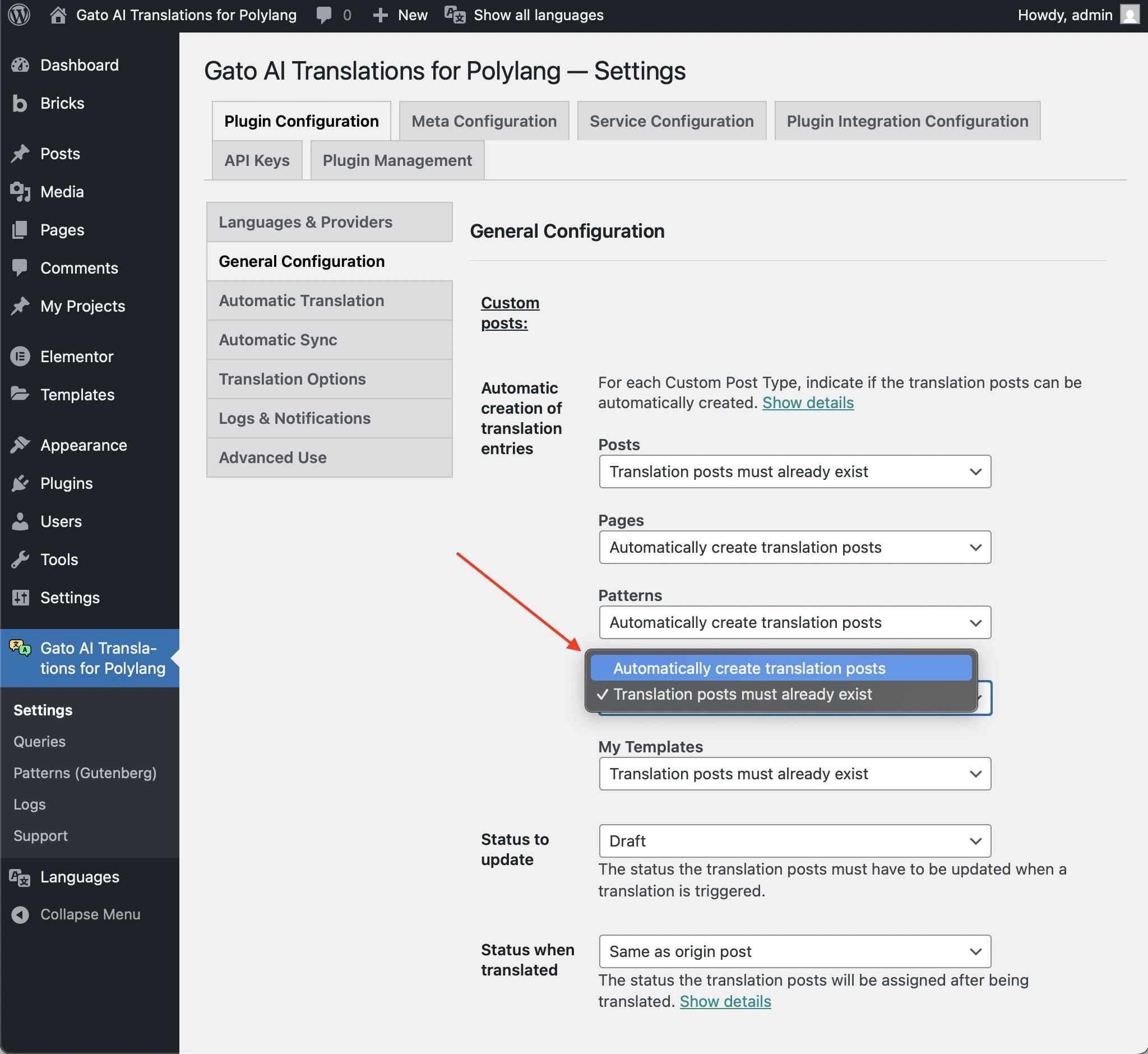
활성화되어 있지 않고, 해당 CPT가 wp_insert_post를 사용하여 항목을 생성하는 경우 해당 옵션을 활성화하세요.
그렇지 않은 경우, 먼저 Polylang을 사용하여 (+ 링크를 클릭하여) 번역 항목을 생성한 다음 번역을 실행해야 합니다.
번역 항목에 예상 상태가 없음
다음과 같은 경고가 표시되는 경우:
Warning [Query "translate-customposts"] Execution successful, but with warnings: 🟡 No custom post(s) was translated, because the translation entries (CPT: 'post', IDs: [48634]) do not have the expected status: 'draft'. If this is unintended, either update the and/or 'Status to synchronize' options in the plugin Settings, or change the status of the translation entries accordingly....이는 번역 항목의 상태가 플러그인 설정에서 구성된 것과 다름을 의미합니다.
예를 들어, Status to update 옵션이 draft로 설정되어 있고 번역 항목의 상태가 publish인 경우 번역이 생성되지 않습니다.
플러그인 설정의 General Configuration에서 Status to update 옵션이 예상 상태로 설정되어 있는지 확인하세요:
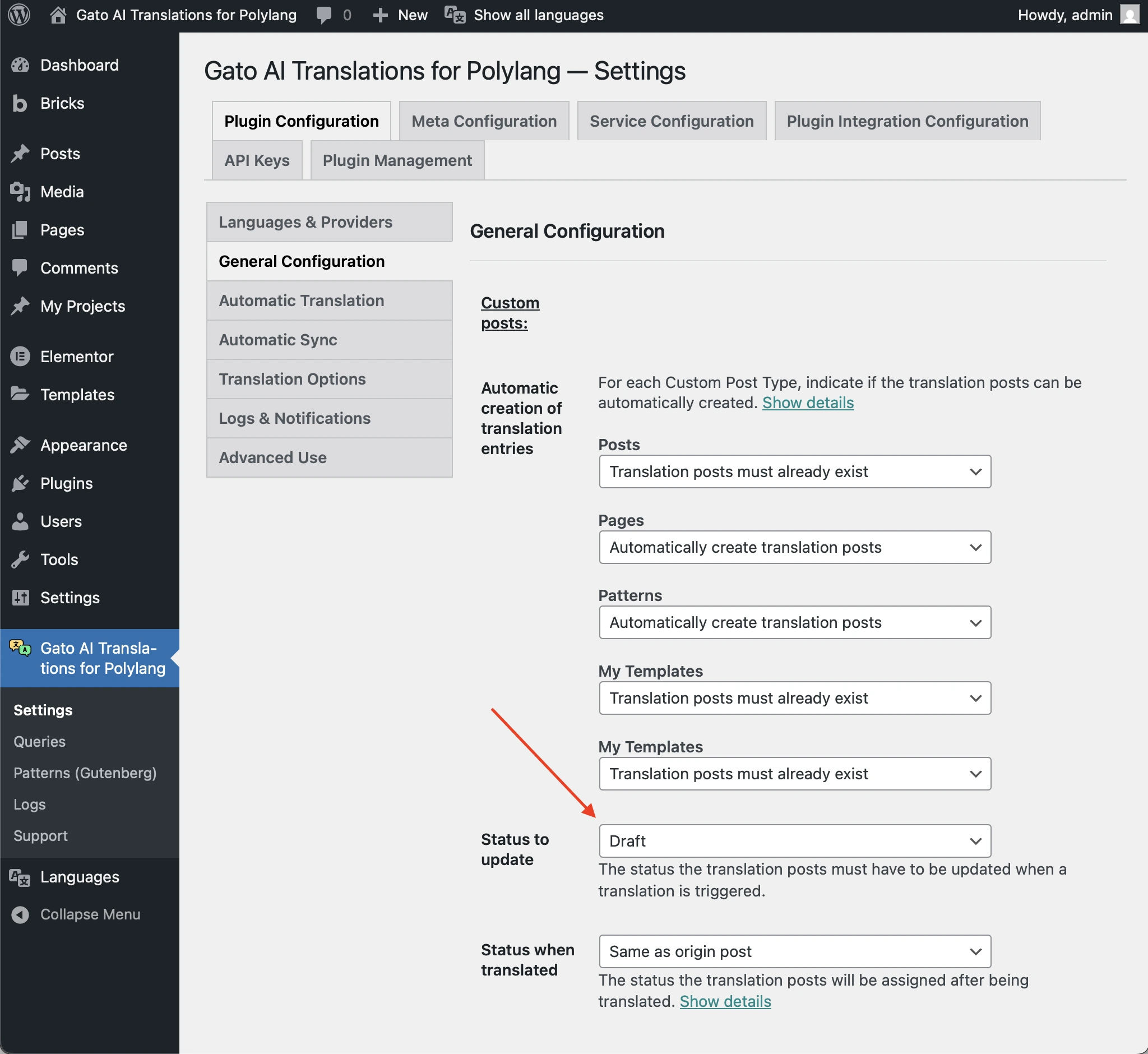
그렇지 않은 경우 번역 항목의 상태를 그에 맞게 변경하세요.
게시물에 오래되거나 손상된 데이터가 포함되어 있음
다음과 같은 경고가 표시되는 경우:
Warning [Query "translate-customposts"] Execution successful, but with warnings: 🟡 There are no custom posts to translate...그리고 로그 항목에 게시물에 번역 게시물이 있음에도 불구하고 이를 인식하지 못하는 것으로 표시된 경우, 게시물에 제거가 필요한 오래되거나 손상된 데이터가 포함되어 있을 수 있습니다.
예를 들어, 이 로그 항목의 "Additional context"를 확인하세요:
{
"queryExecutionResponse": {
"data": {
"originCustomPosts": [
{
"__typename": "GenericCustomPost",
"id": 16597,
"polylangLanguageLocale": {
"code": "en"
},
"polylangLanguage": "en",
"originCustomPostHasDefaultLanguage": true,
"isTranslateFromLanguageProvided": true,
"originCustomPostHasSpecificLanguage": true,
"canTranslateOriginPostFromSpecificLanguage": true,
"canTranslateOriginPost": true,
"customPostIDTranslationCustomPostIDLanguageIDs": {
"es": 16613
},
"hasTranslationCustomPosts": true
}
],
"customPostIDTranslationCustomPostIds": {
"16597": [
16613
]
},
"translationCustomPostIdsList": [
[
16613
]
],
"translationCustomPostIds": [
16613
],
"translationCustomPostIdToCustomPostIDs": {
"16613": 16597
},
"emptyTranslationCustomPostVars": [],
"hasTranslationCustomPosts": false
}
}
}위 예시에서 ID 16597인 영어 원본 게시물("id": 16597, "polylangLanguageLocale": { "code": "en" })에는 ID 16613인 스페인어 번역 게시물("customPostIDTranslationCustomPostIDLanguageIDs": { "es": 16613 })이 있지만, 이를 인식하지 못하고 있습니다("hasTranslationCustomPosts": false).
이 경우, ID 16613인 번역 게시물은 더 이상 존재하지 않지만, ID 16597인 게시물에서 해당 게시물로의 Polylang 관계가 제거되지 않은 상태입니다.
이 오래되거나 손상된 데이터로 인해 플러그인이 게시물 번역에 실패합니다.
문제를 해결하려면 원본 게시물을 다시 만들고 해당 게시물을 번역해야 합니다. 그런 다음 손상된 번역 게시물을 삭제하세요.