

추가 Elementor 위젯 번역하기
Gato AI Translations for Polylang은 위젯 기반의 Elementor 페이지를 번역할 수 있습니다.
이 플러그인에는 모든 Elementor 및 Elementor PRO 위젯에 대한 지원이 포함되어 있습니다. 커스텀 또는 서드파티 위젯의 경우 PHP 훅을 통해 번역 지원을 확장할 수 있습니다.
문자열 번역
Elementor 위젯에 추가 번역 가능한 프로퍼티를 선언하려면 gatompl:elementor_widget_type_translatable_properties 필터를 사용하세요.
이 필터는 [widgetName => properties] 맵을 받습니다. properties 항목에는 다음이 포함될 수 있습니다:
- 플랫 컨트롤 이름 — 예:
'author_name' - 점 경로(dot-path) — 예:
'author_avatar.alt'(settings.author_avatar.alt에 대응) - 리피터 필드 — 서브 배열
[repeaterName => [...subFields]]로 선언
이것들은 자유롭게 혼합할 수 있으며 중첩은 임의의 깊이까지 가능합니다.
예를 들어, 다음 훅은:
- 플랫 컨트롤
author_name과 점 경로author_avatar.alt를blockquote위젯에서 번역 가능하게 합니다 - 리피터 서브 필드
name을reviews위젯의slides리피터 안에서 번역 가능하게 합니다
add_filter(
'gatompl:elementor_widget_type_translatable_properties',
static function (array $translatableProperties): array {
$translatableProperties['blockquote'][] = 'author_name';
$translatableProperties['blockquote'][] = 'author_avatar.alt';
$translatableProperties['reviews']['slides'][] = 'name';
return $translatableProperties;
}
);같은 필터가 단순 컨트롤과 리피터 필드 모두에 작동합니다. 리피터 전용 훅은 별도로 없습니다.
엔티티 참조 번역
프로퍼티에는 번역 시 대상 언어의 해당 엔티티로 재매핑해야 하는 엔티티 ID(게시물, 분류 용어, 미디어 항목 또는 메뉴)가 저장될 수 있습니다. 해당 필터를 사용하세요:
| 참조 종류 | 필터 |
|---|---|
| 커스텀 게시물 및 미디어 | gatompl:elementor_widget_type_custompost_and_media_reference_properties |
| 분류 용어 | gatompl:elementor_widget_type_taxonomy_term_reference_properties |
| ID로 메뉴 | gatompl:elementor_widget_type_menu_reference_by_id_properties |
| 슬러그로 메뉴 | gatompl:elementor_widget_type_menu_reference_by_slug_properties |
형태는 번역 가능한 프로퍼티 필터와 동일합니다 — 플랫 이름, 점 경로 또는 리피터용 서브 배열을 사용할 수 있습니다.
// Custom post / media reference
add_filter(
'gatompl:elementor_widget_type_custompost_and_media_reference_properties',
static function (array $properties): array {
$properties['featured-post'][] = 'post_id';
$properties['gallery']['items'][] = 'image_id';
return $properties;
}
);
// Taxonomy term reference
add_filter(
'gatompl:elementor_widget_type_taxonomy_term_reference_properties',
static function (array $properties): array {
$properties['related-category'][] = 'category_id';
return $properties;
}
);
// Menu reference by ID
add_filter(
'gatompl:elementor_widget_type_menu_reference_by_id_properties',
static function (array $properties): array {
$properties['menu-picker'][] = 'menu_id';
return $properties;
}
);
// Menu reference by slug
add_filter(
'gatompl:elementor_widget_type_menu_reference_by_slug_properties',
static function (array $properties): array {
$properties['menu-picker'][] = 'menu_slug';
return $properties;
}
);위젯 이름과 프로퍼티 이름 확인하기
Translate custom posts GraphQL 쿼리를 실행하고 응답의 elementorData 필드를 확인하세요. 각 위젯은 widgetType과 settings 트리를 노출합니다 — 위의 훅에 전달해야 하는 프로퍼티 이름(중첩된 점 경로 및 리피터 필드 포함)을 여기서 찾을 수 있습니다.
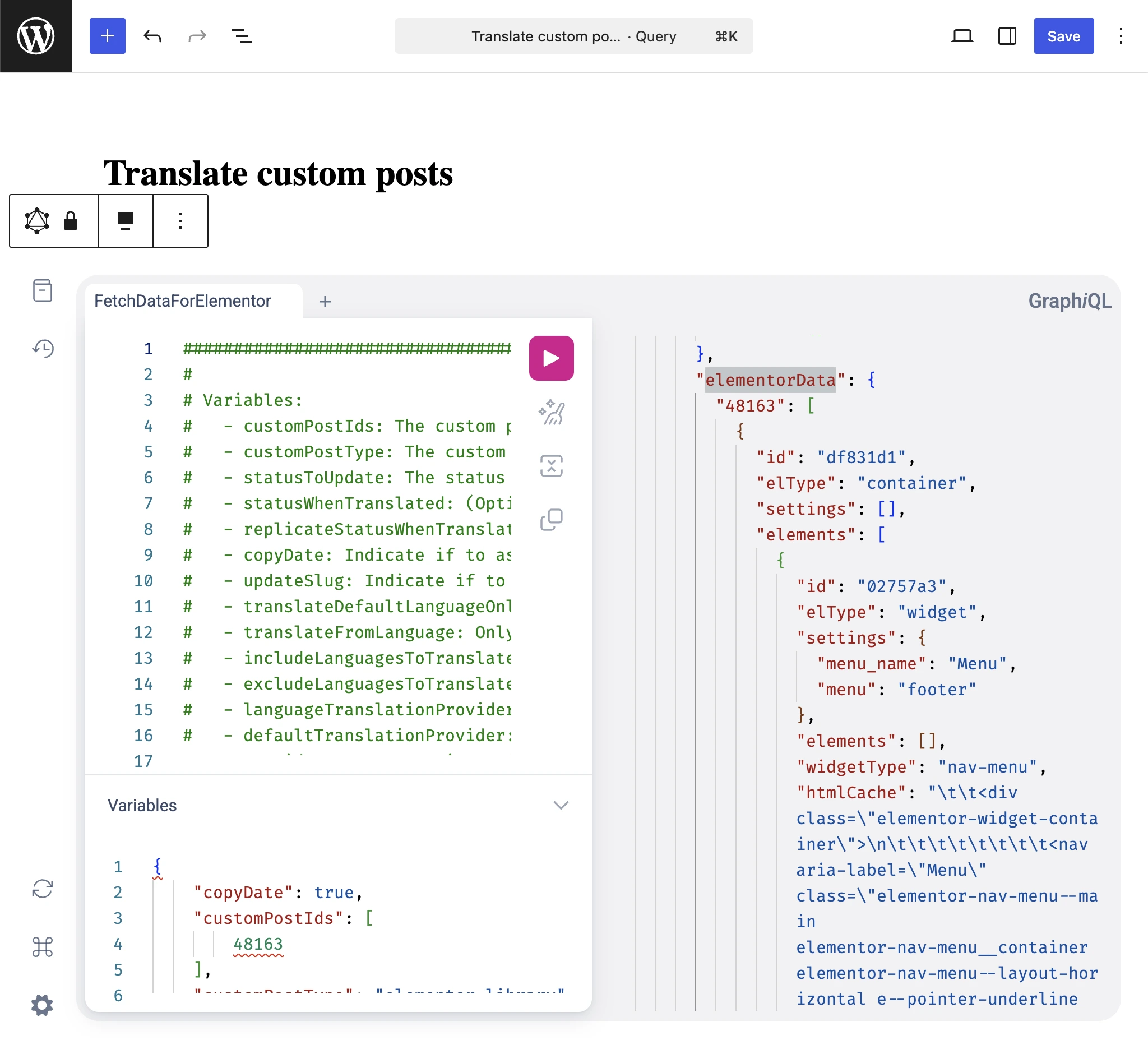
이 쿼리를 실행하는 방법은 페이지 빌더 데이터 가져오기 및 번역 가이드를 참조하세요.
예시 참조 위치
플러그인 자체의 통합 구현이 유용한 참조가 됩니다. 설치한 플러그인 내의 다음 파일을 살펴보세요:
wp-content/plugins/gato-ai-translations-for-polylang/src/ConditionalOnContext/LicenseIsActive/ConditionalOnModule/Elementor/Constants/WidgetTypes.php